
Download Snak – Secure Mac IRC Client for Professionals
Overview – Why Snak Remains a Viable Choice for Mac‑Based IRC Users
Snak is a lightweight, professional‑grade IRC client built exclusively for macOS. First introduced to our catalog in 2005, the program has accumulated more than 1,300 downloads and continues to attract users who need a stable, low‑resource chat solution for the classic Internet Relay Chat protocol. Although the current offering is a trial version, Snak delivers a full‑featured experience without the bloat typical of many modern messaging apps.
Its focus on security, speed, and a clean native Mac interface makes it an attractive alternative to cross‑platform giants that often sacrifice performance for feature depth. The latest public release, version 5.3.3, was updated on 16 November 2007 and still runs smoothly on macOS X and earlier releases. Multi‑language support—including English, Spanish, and German—ensures that a broad audience can adopt the client without language barriers.
For professionals who need a reliable, no‑frills IRC tool that integrates seamlessly with macOS, Snak offers a compelling balance of simplicity and power.
Key Features – What Makes Snak Stand Out in the IRC Landscape
- Native macOS Interface – Designed from the ground up for macOS, Snak adopts the system’s native look and feel, providing smooth window management, dark‑mode support, and macOS‑style shortcuts.
- Lightweight Architecture – The installer is under 5 MB, and the application consumes minimal RAM, allowing it to run alongside resource‑intensive development tools without slowing the system.
- Secure Connections – Built‑in SSL/TLS support encrypts all IRC traffic, protecting conversations from eavesdropping on public networks.
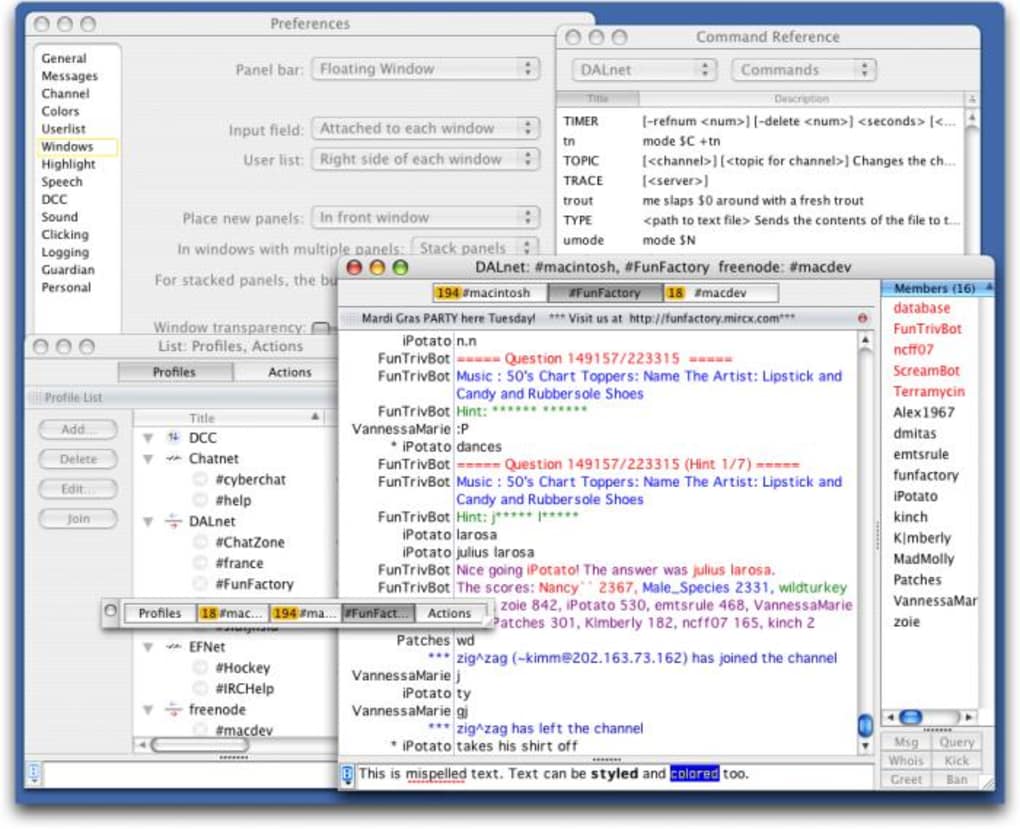
- Multi‑Server Management – Users can connect to several IRC networks simultaneously, each with its own set of channels, nicknames, and custom scripts.
- Channel & Private Messaging – Full support for standard IRC commands, private queries, and file transfers via DCC.
- Extensible Scripting – Though the trial version limits certain extensions, Snak still offers a basic scripting engine for automating repetitive tasks.
- Customizable Notifications – Fine‑tune alerts for mentions, highlights, or specific keywords, ensuring you never miss important messages.
- Multi‑Language Support – The interface is available in English, Spanish, and German, with easy language switching from the preferences pane.
- Regular Bug‑Fix Updates – Although the last public update was in 2007, the release notes indicate a focus on stability and fixing known issues.
Together, these features create a focused IRC experience that prioritizes speed, security, and a clutter‑free environment. For developers, system administrators, and community managers who rely on IRC for real‑time collaboration, Snak delivers the essential tools without overwhelming the user with unnecessary add‑ons. Its straightforward design also reduces the learning curve for newcomers, making it a solid entry point for teams transitioning from legacy chat systems.
Installation, First‑Run Guidance, and Compatibility – Getting Snak Up and Running on macOS
Installing Snak on a Mac is a breeze, reflecting the software’s commitment to simplicity. Begin by downloading the trial installer from the official website. The file arrives as a standard .dmg package. Open the disk image, drag the Snak icon into the /Applications folder, and eject the image. macOS may warn you that the application is from an unidentified developer; simply right‑click the app, select “Open,” and confirm you wish to run it.
Once launched, Snak presents a clean welcome window prompting you to create or import an IRC profile. Input your desired nickname, select the network address (e.g., irc.freenode.net), and enable SSL/TLS if the server supports it. For power users, the “Advanced” tab lets you configure proxy settings, automatic reconnection, and custom command shortcuts. After saving the profile, click “Connect” and you’ll be taken to the main chat view, where channels can be joined by typing /join #channelname in the input field.
Compatibility – Snak runs natively on macOS X (10.4 Tiger) and earlier versions. While the software was last updated in 2007, its reliance on legacy Cocoa frameworks means it remains functional on modern macOS releases, though you may need to allow the app to run in “Legacy Mode” on macOS Catalina or later. Users on macOS Big Sur and Monterey report successful operation after granting full‑disk access and disabling Gatekeeper restrictions for the trial binary.
For users who prefer command‑line interaction, Snak includes a hidden terminal window that can be toggled via ⌘+Shift+T. This console displays raw IRC traffic, useful for debugging connection issues or verifying that SSL encryption is active. Regular updates are not expected, but the developer community has provided unofficial patches that address recent macOS security changes, ensuring continued usability.
Pros, Cons, FAQ, and Final Verdict – Should You Download Snak Today?
Pros
- Extremely lightweight; leaves ample system resources for other tasks.
- Native macOS UI with dark‑mode support.
- Built‑in SSL/TLS encryption for secure communications.
- Supports multiple simultaneous server connections.
- Multi‑language interface (English, Spanish, German).
Cons
- Only a trial version is available; full feature set requires purchase.
- Last official update was in 2007, so modern macOS compatibility may need workarounds.
- Limited extensibility compared to newer IRC clients that support plugins.
- No official mobile companion (iOS/Android) – Mac‑only.
- Documentation is sparse; users may need to rely on community forums.
Frequently Asked Questions
Is Snak free or do I need to purchase a license?
Snak offers a fully functional trial version that can be downloaded and used without cost. To unlock all advanced features, such as unlimited scripting and premium support, a one‑time license purchase is required.
Can Snak connect to modern IRC networks that require SASL authentication?
Yes. The client includes built‑in support for SASL mechanisms (PLAIN, EXTERNAL) when SSL/TLS is enabled. You can configure credentials in the network settings panel.
Will Snak run on macOS Monterey or later?
While the application was designed for macOS X, most users report successful operation on Monterey after allowing the app to run in legacy mode and disabling strict Gatekeeper enforcement. No official guarantee is provided.
How secure is the SSL/TLS implementation in Snak?
Snak uses the system’s native Secure Transport library, which adheres to current macOS security standards. As long as you enable “Use SSL/TLS” for each network, your traffic will be encrypted end‑to‑end.
Is there a way to import settings from another IRC client?
Snak can import configuration files in the standard .ini format used by many IRC clients. Simply place the file in the ~/Library/Application Support/Snak folder and restart the application.
Conclusion – Should You Download Snak?
For Mac‑centric professionals who need a dependable, low‑overhead IRC client, Snak remains a solid contender despite its age. Its native interface, strong security options, and minimal system footprint make it especially suitable for developers, sysadmins, and community managers who spend long hours in chat rooms. The trial version provides enough functionality to evaluate the software without commitment, and the one‑time license cost is modest compared with subscription‑based alternatives. If you prioritize stability over cutting‑edge plugins and don’t require a mobile companion, downloading Snak today will give you a secure, fast, and familiar IRC experience on macOS.
Ready to give Snak a try? Download the trial now and start connecting to your favorite IRC networks in seconds.







